Protegrity & Exasol
overview
Exasol teams rely on production-grade data for reporting, business intelligence, and advanced analytics, but sensitive fields such as PII, PCI, and PHI require consistent protection and controlled access. Protegrity integrates natively with Exasol through scalar user-defined functions, bringing tokenization, masking, encryption, and controlled unprotection into familiar SQL queries and views.
When a protection function is called, Exasol sends the selected value and relevant user context to Protegrity Application Protector through a secured REST connection. Protegrity evaluates centralized policies and returns the permitted result, allowing teams to work with governed data without creating a separate export, protection, and reload process.
Key Integration Feature
Protegrity exposes protect, unprotect, and reprotect operations as scalar SQL functions through a dedicated Exasol script-language alias. This native SQL integration lets data engineers apply policy-driven protection within existing analytical workflows while Protegrity centrally manages data elements, access rules, and protection methods.
During query execution, the integration can evaluate the logged-in session user or the owner of the queried view. Protegrity then determines whether the field should return clear text, a masked value, or a token based on the applicable policy.
Features & Capabilities
Native SQL integration with centralized Protegrity policy for sensitive data across Exasol analytics workflows.
01
Native SQL Protection for Exasol Analytics
Why it Matters
Data engineers and analysts can apply protection from the Exasol SQL workflows they already use. This reduces the need to build separate ETL processes solely to tokenize, mask, or encrypt sensitive fields.
How it Works
A data engineer creates a Protegrity scalar UDF for an email data element. Analysts can invoke that function within a query or view to return protected email values according to the configured policy.
02
Protect, Unprotect, and Reprotect Data
Why it Matters
Protection requirements can change as classifications, policies, and cryptographic configurations evolve. Teams need a controlled way to update protection without exposing original values or rebuilding downstream analytical queries.
How it Works
Configured Exasol UDFs call the protect, unprotect, or reprotect methods. A reprotect workflow can reference both an existing and replacement data element so selected values can be moved to a new protection configuration through SQL.
03
Role-Aware Access for Shared Analytics
Why it Matters
The same Exasol dataset may serve analysts, applications, view owners, and privileged users with different access requirements. Protegrity uses identity context to determine which representation of a protected field each request should receive.
How it Works
Administrators configure the integration to evaluate either the logged-in session user or the owner of the queried view. Protegrity policy then determines whether the result is returned as clear text, masked data, or a token.
04
Flexible Protection Service Deployment
Why it Matters
Organizations may need the Protegrity protection service to run in a specific location based on infrastructure, security, residency, or operational requirements.
How it Works
Application Protector REST can be deployed in an approved on-premises, cloud, or hybrid environment independently of Exasol. The configured scalar UDFs connect to the designated REST API hosts during SQL execution.
05
Secure REST Connectivity and Host Distribution
Why it Matters
Production analytics workloads require protected communication between Exasol and the Protegrity service. Organizations may also need multiple service endpoints to distribute requests and support service availability.
How it Works
Administrators configure trusted certificates, mutual TLS, and one or more REST API hosts for the integration. Exasol sends supported protection requests to the configured endpoints while Protegrity returns the policy-governed result.
Architecture &
Sample Data Flow
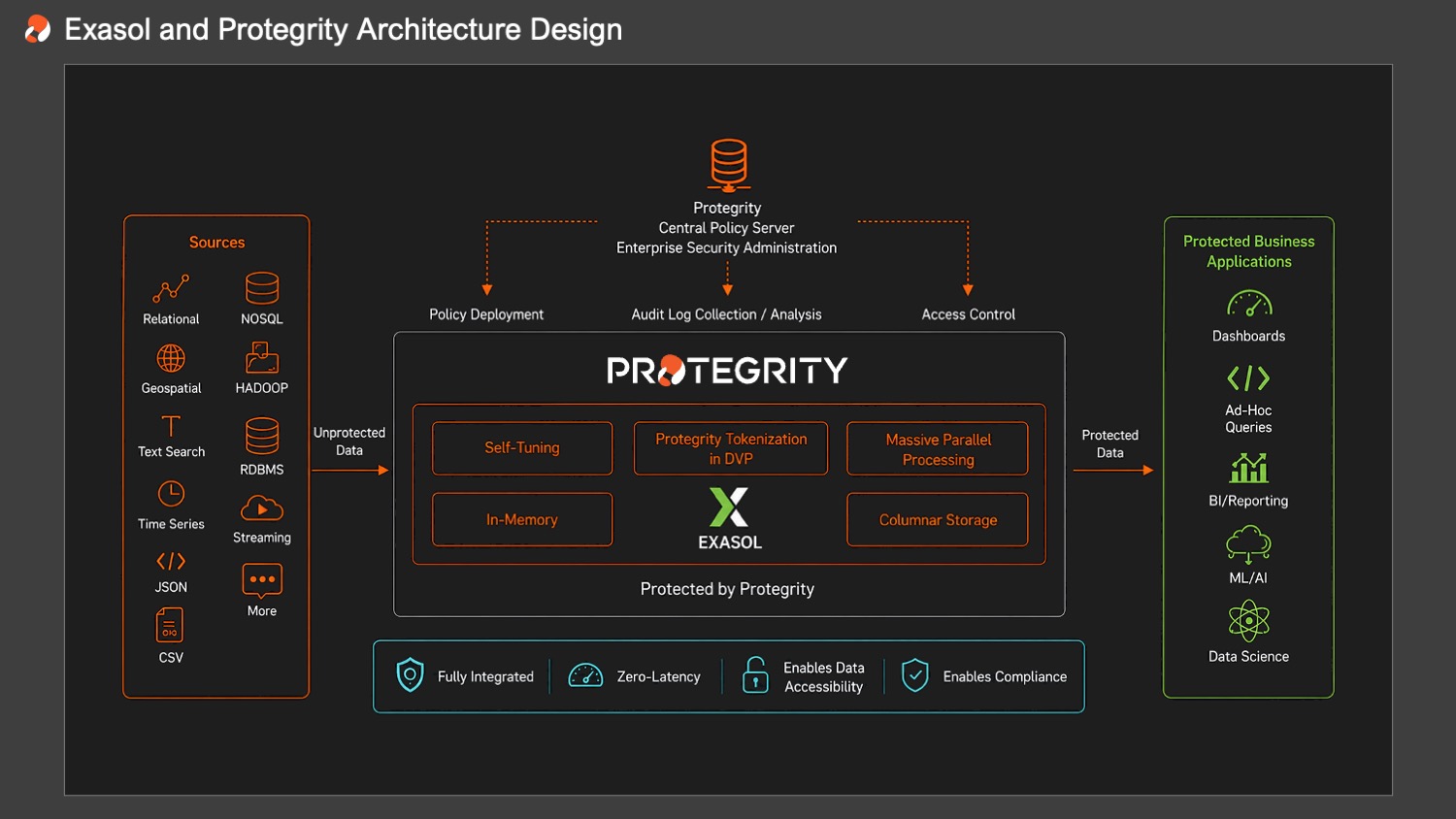
Exasol scalar UDFs connect SQL workflows to the Protegrity Application Protector REST API. Protection definitions are configured as Protegrity data elements and referenced by name within each UDF.
When a query invokes a protection function, Exasol sends the selected value, requested method, data element, and user context to a configured REST API host. Protegrity evaluates policy, performs the approved operation, and returns the result so Exasol can continue processing the query.
The data journey
Visualizing the data journey
The data journey
The data journey explained
-
01
Define protection policies and data elements
Security teams configure the Protegrity data elements and policies that control how sensitive fields should be protected and which identities may receive unprotected values.
-
02
Configure the Exasol script alias and UDFs
Database administrators enable the Protegrity script-language alias and create scalar UDFs for the required protect, unprotect, and reprotect methods.
-
03
Invoke protection from Exasol SQL
A query or view calls the configured UDF for a selected field. Exasol sends the value and relevant identity context to Application Protector through the secured REST connection.
-
04
Return the policy-governed result
Protegrity evaluates the request and returns the permitted tokenized, masked, encrypted, or unprotected value. Exasol continues the query and delivers the governed result to the requesting user or application.
DEPLOYMENT
Protegrity Application Protector is deployed independently of Exasol and connects to configured scalar UDFs through a secured REST interface. The integration can support approved on-premises, cloud, or hybrid deployment patterns based on infrastructure and policy requirements.
Configure Application Protector
Enable the Protegrity Script-Language Alias
Install Connection Certificates
Create Scalar UDFs
Configure REST Hosts
Validate Exasol Compatibility
RESOURCES
Technical guidance and supporting information for planning and implementing the Protegrity and Exasol integration.
Exasol Protegrity Integration Documentation
Review Exasol guidance for configuring the Protegrity script-language alias, scalar UDFs, certificates, REST hosts, and supported protection methods.
READ MOREProtegrity Application Protector Documentation
Explore technical guidance for deploying the Application Protector REST service, configuring data elements, managing policies, and connecting approved applications.
READ MOREProtegrity and Exasol Partnership
Learn how Protegrity and Exasol work together to support protected analytics on sensitive enterprise data.
READ MORE